
Postcode Radius Search: Logistics Guide & FAQ
Our postcode radius search was built from day-to-day dispatching work, so that transport planners, freight forwarders and dispatchers have a fast, clear tool for planning areas and routes. This guide shows you how to get the most out of our tools, because an accurate radius calculation saves real time in everyday logistics.
Key features of the postcode radius search
These tools are what turn a simple map into a real dispatching tool and make everyday workflows noticeably faster.
3D loading metre calculator
Alongside the postcode radius search, this tool models the load space of lorries in 3D, so you can see loading metres, pallet spaces and weights straight away. With Paste load list you can take items directly from the order text or from a screenshot on your clipboard.
The interactive compass
A real advantage for targeted freight requests: if you are looking for a part load and only want to head north, this filter helps immediately. Switch on the compass, point it north and the results list filters itself in real time. With the red “Invert” button you can also rule out specific directions.
One-click postcode copy for freight exchanges
No more selecting text by hand or copying stray spaces. Hover over a postcode and click the clipboard icon (📋). The system copies just the digits to your clipboard, which speeds up entering them in freight exchanges such as Timocom or Transporeon.
Instant Excel & PDF export
If you want to send the postcode areas you found to a haulier or add them to your transport management system, one click is all it takes: as a CSV file for importing, as an Excel file or as a PDF with the PLZ Profi logo. The export contains the list you are currently looking at, with postal region, straight-line distance, direction and, if calculated, road distance and drive time.
Country guides: logistics & postcode systems in Europe
International dispatching needs detailed local knowledge, so we explain the specifics of the postcode systems in all 10 supported countries.
Germany has one of the densest transport networks in the world, so structured dispatching really pays off here. Postcodes are strictly five digits, and the first two digits form the postal region, which gives planners a reliable sense of direction at a glance. The guidelines of the Federal Office for Logistics and Mobility (BALM) help you plan routes and roadside checks in advance.
- Leading zeros: Postcodes in eastern Germany often start with a zero, for example Dresden (01067) or Leipzig (04109), and spreadsheets like to drop it. Our postcode radius search and the Excel and PDF exports keep leading zeros because the values are stored as text. If you open a CSV file directly in Excel, however, Excel removes them, so use the Excel export when you work in Excel.
- Freight hotspots: Huge volumes of freight are concentrated in conurbations such as Rhine-Ruhr and Rhine-Main. A 50 km radius there returns a long list of results, which is exactly where the compass filter helps you narrow things down to the direction you actually need.
Austria is a key bottleneck for north-south traffic in Europe, especially along the Brenner and Tauern motorways. Postcodes have four digits, and the first digit stands for the federal state. Do not underestimate the Alpine terrain when choosing a route: places that are close as the crow flies often involve long detours over mountain passes. It is worth checking the straight-line distance against real route information from ASFINAG, the Austrian motorway operator.
- Mountain roads and drive times: A village in Tyrol may be just 30 km away in a straight line but more than 80 km by road. That is why our built-in route calculator gives you a far more realistic idea of drive times.
- Transit corridors: You can also search specifically for part loads in the Alpine valleys along the main transit routes and avoid running empty.
Spanish postcodes also have five digits and reflect the country’s fifty provinces. Spain is a classic market for long distances and temperature-controlled transport, with the main hubs around Madrid, Barcelona and Valencia. You can type Spanish place names in our postcode radius search without accents, as the search recognises them automatically.
So you will find Málaga or A Coruña even if you leave out the accents, which saves valuable seconds on international freight requests.
The Czech Republic is an industrial powerhouse in Central Europe, and cross-border traffic is part of everyday life. The official format is five digits with a space after the third. Our search field accepts postcodes with or without the space. When you copy a result, the space is removed on purpose so it does not cause errors when you paste it into a freight exchange.
No more tidying up postcodes by hand, which makes dispatching between Germany and the Czech Republic noticeably smoother.
Hungary connects Austria with South-East Europe. The main routes radiate out from Budapest: the M1 towards Vienna, the M5 towards Serbia, the M7 towards Croatia and the M3 to the north-east. Postcodes have four digits, and the first digit identifies one of nine postal regions, for example 4 for Debrecen, 6 for Kecskemét and Szeged or 9 for Győr.
- Budapest: Postcodes in the capital start with 1, and the second and third digits give the district. 1044, for instance, is in District IV and appears in our search as “Budapest IV. kerület”.
- Tolls: Lorries over 3.5 tonnes pay a distance-based toll via HU-GO on motorways, expressways and many main roads.
- Special characters: You can find places like Győr or Székesfehérvár without accents, simply by typing “Gyor” or “Szekesfehervar”.
With the Port of Antwerp-Bruges, Belgium has one of the largest seaports in Europe, and the E40, E19, E313 and E411 corridors link the ports and cities with Germany, France and Luxembourg. Postcodes have four digits, and the first digit usually stands for the province, for example 2000 Antwerp, 4000 Liège, 8000 Bruges or 9000 Ghent.
- Shared ranges: 1xxx covers Brussels and parts of Flemish and Walloon Brabant, 3xxx eastern Flemish Brabant and Limburg, and 6xxx Hainaut and the province of Luxembourg. In these ranges, the first digit alone does not tell you the province.
- Local place names: Places are listed in the language of their region, for example “Liège” and “Antwerpen”. Brussels is listed in both languages (Bruxelles and Brussel), and English names such as Antwerp, Ghent and Bruges also work in the search.
- Tolls: Since April 2016, lorries over 3.5 tonnes have paid a distance-based toll in all three regions (Viapass).
French postcodes (code postal) have five digits. The first two almost always match the département, for example 67 for Bas-Rhin with Strasbourg or 13 for Bouches-du-Rhône with Marseille. Corsica uses 20, and the overseas territories start with 97. Our data comes from the official INSEE and DGFiP listing and covers around 35,000 municipalities.
- Shared postcodes: Many small municipalities share a postcode. PLZ Profi still shows each municipality at its own location, so the distance to the village is correct. Paris, Lyon and Marseille have one postcode per district (arrondissement).
- Tolls and driving bans: Most motorways are tolled (péage). Lorries over 7.5 tonnes are generally banned from Saturday 10 pm to Sunday 10 pm and on public holidays.
- Spelling: You do not need to get hyphens, accents or abbreviations such as “St” or “Ste” exactly right.
Polish postcodes (kod pocztowy) have five digits with a hyphen, for example 00-950 Warszawa. The first digit stands for a large region: 0 Warsaw, 5 Wrocław, 6 Poznań, 7 Szczecin, 8 Gdańsk and 9 Łódź. Large cities often have one postcode per street, and Warsaw alone has more than 2,400 in our data.
- Input and copying: 50-001, 50001 and 50 001 all give the same result. The list shows the official format, and only the digits are copied.
- Tolls: Vehicles over 3.5 tonnes pay a distance-based toll on tolled motorways, expressways and national roads via e-TOLL.
- Special characters and other names: “Lodz” finds Łódź and “Gdansk” finds Gdańsk. English names such as Warsaw and common German names such as Breslau or Danzig are recognised too.
Dutch postcodes have four digits and two letters, for example 3011 AB. The letters narrow the area down to individual street sections. For radius searches and dispatching the four digits are enough, so PLZ Profi works with around 4,000 areas. If you enter the full postcode, the search automatically uses the first four digits.
- Ports and border crossings: Rotterdam is the largest seaport in Europe. Key crossings into Germany are on the A12 near Emmerich, the A1 near Bad Bentheim and the A67 near Venlo.
- Tolls: Since July 2026, lorries over 3.5 tonnes have paid a distance-based toll on motorways and some other roads (vrachtwagenheffing), which replaces the Eurovignette.
- The Hague and Den Bosch: The official names are ’s-Gravenhage and ’s-Hertogenbosch. The search finds both, as well as English names such as The Hague.
Romanian postcodes (cod poștal) have had six digits since 2003. The first two stand for the county (județ), and in Bucharest for the sector: 01 to 06 are sectors 1 to 6. Large cities have one postcode per street or block, while villages usually share one postcode per municipality.
- Main routes and port: From the west, the A1 runs via Nădlac, Arad and Timișoara towards Deva and Sibiu. The largest port on the Black Sea is Constanța.
- Tolls: Since October 2026, vehicles over 3.5 tonnes have paid the distance-based TollRo toll, which replaces the previous vignette (rovinietă) for lorries.
- Alternative names: The search understands English names such as Bucharest as well as German names such as Hermannstadt or Temeswar. “Timisoara” finds Timișoara.
- Data coverage: The data comes from OpenStreetMap and is less complete in Romania than in Germany. If a place is missing, please let us know via our contact page.
Top 5 questions about the postcode radius search
The essentials at a glance, answered clearly and quickly.
Is PLZ Profi really free to use?
Yes, all current features are free. We built PLZ Profi to make everyday dispatching noticeably easier. The live map, the interactive compass, the 3D loading metre calculator and all export formats are available free of charge and without registration. Ads may be shown on the pages to help fund the service.
Does PLZ Profi store my searches or company data?
Not your company data, and your search history only locally in your browser. Search history and load lists are stored only in your browser’s local storage. To calculate road distances, your browser sends just the start and destination coordinates to our routing server. With your consent, we also use Google Analytics to see how the tools are used, for example country, radius and postal region of a search, but never the search terms you type. Details are in our privacy policy.
Why do the map markers disappear when I choose “All”?
This is a deliberate safeguard for your computer. If you search a 100 km radius in a densely populated region, the system finds hundreds of postcodes. Showing all of them on the map at once could overload your browser. With this setting, the map therefore only shows the starting point, while the full list on the right shows every result.
How does PLZ Profi calculate distances?
In the postcode radius search, the main distance is the exact straight-line distance between the geographic centres of the places. For Germany and Austria, our own routing server also calculates real road distances and estimated drive times, which makes freight costing even more precise. For the other countries, PLZ Profi shows the straight-line distance.
Can I import the results straight into my TMS?
Yes. In the export menu you can download the filtered list as a CSV file, comma-separated and with no title rows, so it imports smoothly into transport management systems and freight exchanges. To share results with customers or hauliers, there is also an Excel and a PDF export with logo and search details.
Detailed answers about all features
Further explanations of how the search works technically and of the built-in 3D loading calculator.
🔍 Questions about the postcode radius search and the platform
Which countries does the postcode radius search cover?
Do I need to type special characters or local spellings exactly?
How does grouping by “Top 10” or “Top 20” work?
How reliable and up to date is the postcode data?
Can I use the postcode radius search on a tablet or smartphone?
Is there an API for my own freight software?
🚛 Questions about 3D load planning and loading
How does the PLZ Profi 3D loading metre calculator work?
How does “Paste load list” work with text or screenshots?
Are documents uploaded to a server when I paste an image?
How does the copy image feature help with dispatching?
3D load planning & loading metre calculation in real time
End-to-end dispatching made easy: alongside our proven postcode radius search, the new 3D loading metre calculator is a powerful tool for optimising your loads. According to Eurostat, around 78% of freight transport by road, rail and inland waterway in the EU went by road in 2023, so making full use of every trailer saves real money.
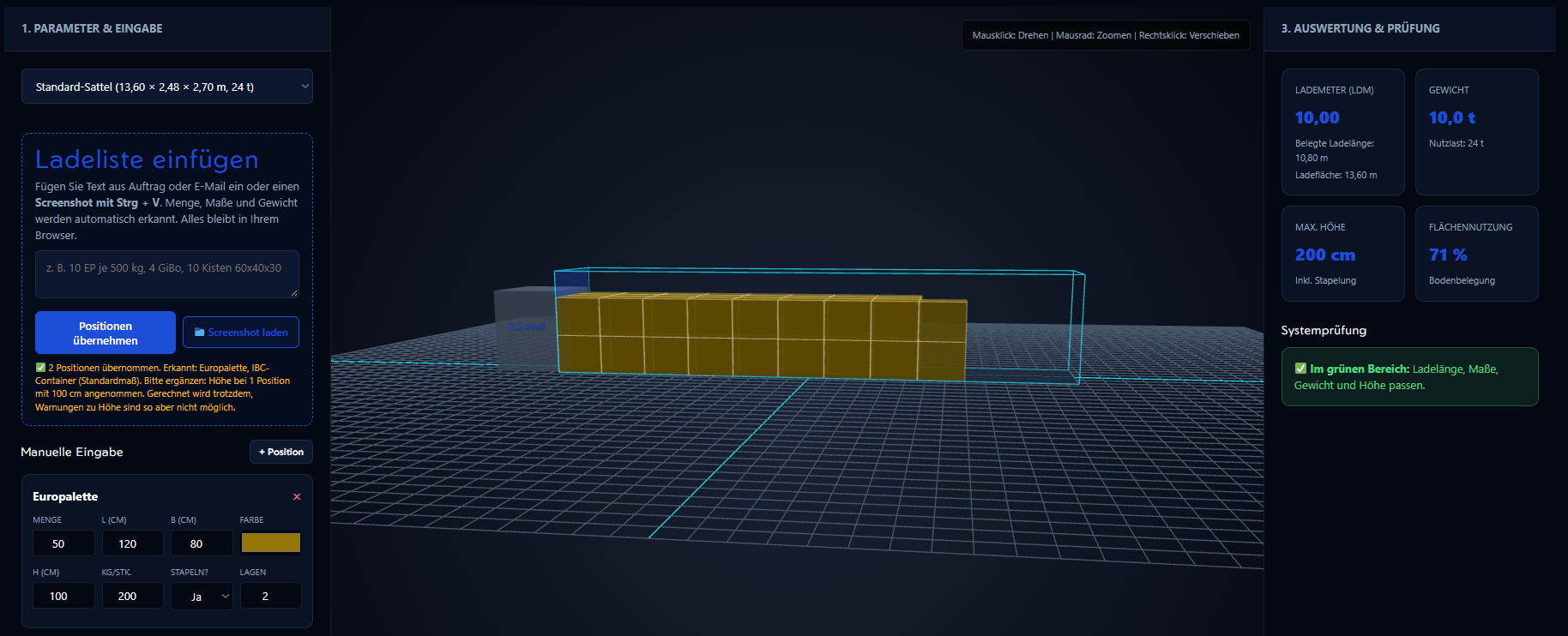
A real help in daily work: with Paste load list you can add items as a line of text or as a screenshot with Ctrl + V from your clipboard. Text recognition runs locally in your browser, so no confidential customer data is sent to external servers. One click on Copy image puts the finished 3D loading plan with all key figures straight into your emails or freight exchanges.
Roadmap: what’s coming next
We keep developing the platform so that dispatchers continue to get practical features.
Advanced lorry routing profiles
Road distance calculation is already live in the postcode radius search. We are now working on specific lorry profiles with axle load limits, bridge clearances and toll roads for even more accurate route estimates.
Expanding the EU network
10 countries are now live, with France, Poland, the Netherlands and Romania the most recent additions. Next, we are looking at datasets for Slovakia (SK), Slovenia (SI), Croatia (HR) and Italy (IT). New countries appear first on the EU country overview.
Advanced filters for border regions
A frequent request from dispatchers: near a border, include the postcodes of the neighbouring country in the same radius with a single click.